
CHECK 01
Translate connectivity into a short feature request
Ask whether the customer requires calls, music, phone-based maps or the specific projected interface. Write each mandatory function separately. A successful music stream should not close a requirement for Android Auto, and a working built-in map does not establish CarPlay support. The supplier needs an observable target rather than a vague smart-screen description.
State whether an adapter is acceptable and whether the requested arrangement must be wired or wireless. These preferences can materially change which candidates are suitable. Distinguish an essential requirement from a convenience preference before rejecting or accepting an offer whose screen looks similar to another version’s equipment.
The current Malaysia EMZOOM presentation explicitly names Apple CarPlay and Android mirroring. Android mirroring is not, by itself, confirmation of Android Auto; ask for the exact required application and task to be demonstrated. Neither Malaysia description certifies a China-market head unit.
The audio-package value review requires the wanted receiving routine rather than accepting different seller playback as proof of the original request.
CHECK 02
Match the screen to the actual vehicle
Request source-market and production information along with the fitted head-unit description. The GS3 equipment guide separates styling from verified features. Ask whether the system is original or changed and whether any additional module is involved. An exterior R-STYLE description does not settle those cabin questions.
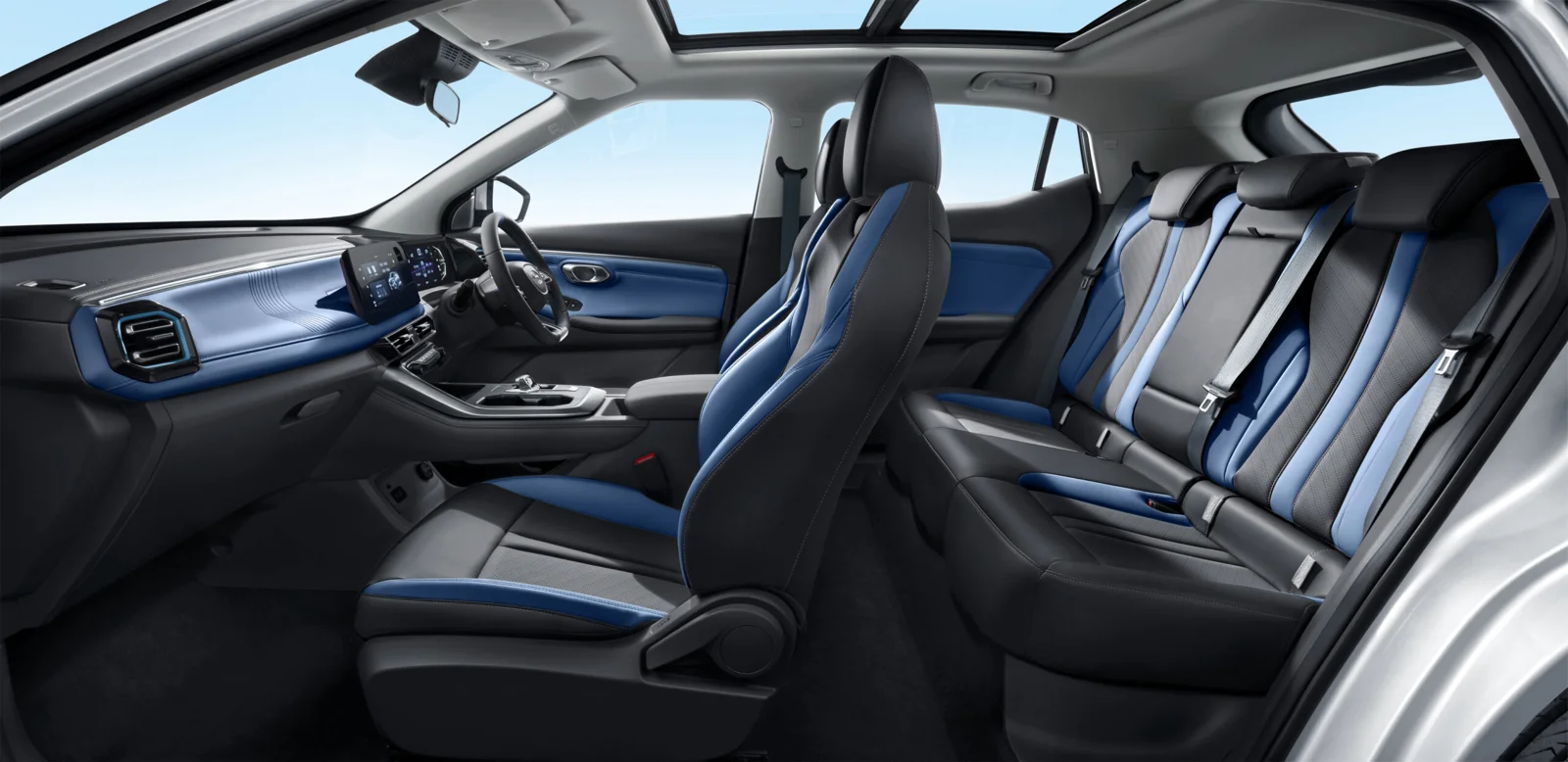
The reference cabin image used here is a Malaysia-market right-hand-drive example. It is not evidence of the steering position or software in a China-sourced car. Request photographs and function evidence from the actual offer rather than treating the reference image as a specification sheet for every GS3 or EMZOOM.
CHECK 03
Observe setup from a disconnected state
Ask for a demonstration while safely parked, beginning before the phone is connected. Show the relevant cable or adapter, the connection steps and the requested interface. Record the phone used and enough context to explain the result without exposing personal messages, account credentials or unrelated private information.
Check a small number of ordinary tasks that match the customer’s needs. Note any manual steps needed after restart or reconnection. A video of an already operating screen can be useful, but it may leave the buyer unable to distinguish a native function from an accessory arrangement that must be supplied separately.
CHECK 04
Test language where decisions are made
Ask to see important vehicle menus, audio controls and the requested phone interface. Language availability may differ between those areas. An English phone application does not prove every vehicle setting has an English option, so avoid converting one successful screen demonstration into a claim of complete cabin-language support.
Record any remaining language limitation with representative examples that the buyer can assess. Do not propose unsupported firmware work as a routine solution. If a provider offers conversion or replacement, request its scope and support terms, and treat the resulting installation as a changed configuration requiring its own acceptance review.
CHECK 05
Distinguish local operation from connected services
The connected-function guide separates vehicle controls from accounts and regional services. A phone-projection test in the source location does not prove an embedded subscription, online navigation service or remote-control application will function in the destination. Identify those dependencies individually instead of promising overseas compatibility for the whole screen.
If a destination function is untested, retain that status in the proposal. The buyer may accept a car with verified essential local functions while planning separately for other services. That is a clearer decision than relying on the seller’s account or assuming a service shown on an overseas website transfers automatically.
CHECK 06
Count the equipment included in the offer
List cables, adapters or modules required for the demonstrated setup and establish whether they are included. A borrowed accessory used for a sales demonstration may not travel with the vehicle. Ask who supports the arrangement if an accessory or head-unit replacement is part of the preparation being purchased.
The stock-vehicle PDI guide connects final equipment checks to delivery. Repeat the relevant demonstration after material preparation changes. Keep previous-user information and access transfer within supported processes rather than retaining someone else’s login as an informal workaround for a feature the buyer expects to own and use independently.
If the seller changes software before release, follow the post-update function checks and repeat the buyer’s agreed connection on the delivered setup.
CHECK 07
Record the answer by function
Use a short result list: requested function, tested device, connection method, demonstrated outcome and unresolved dependency. Keep optional functions separate. A precise record allows the receiving dealer to reproduce the agreed setup and avoids the ambiguity of a quotation that simply says full multimedia or international version.
Send Panda that feature request with the accepted years, condition and destination. Ask for evidence tied to the candidate selected for the order. If another car is substituted, review its equipment again; a successful demonstration on one GS3 is not transferable proof for every similar-looking vehicle in the same sourcing batch.
Relevant references: GAC Malaysia: regional phone-connection wording. References describe their stated market or technology; verify the offered vehicle separately.
Make the next request specific.
Send the condition, accepted years and version, destination and quantity. Include the items that must be confirmed before you accept a candidate. A sourcing enquiry begins the discussion; availability and purchase terms require an actual offer.
Discuss a suitable GS3 →